10 min read
SEO for scaffolding companies and scaffolders
What scaffolding firms should fix first: Google Business Profile, service pages, proof of competence and the basics that help AI answers describe you accurately.
Read articleOpenAI now lets businesses claim and verify their profile in ChatGPT. How to do it, what UK businesses can and cannot claim yet, and what to do when verification fails.
On 10 November 2026 OpenAI opened Businesses in ChatGPT, a beta that lets a business claim its profile inside ChatGPT, correct the details ChatGPT shows, and see how often ChatGPT mentions it and sends people to its website. You do all of it in a new area called Business Hub. This guide covers how to claim and verify your business, what UK businesses can and cannot do yet, and what to do when verification fails, which it often does in launch week.
In short: sign in to ChatGPT, open Business Hub, search for your business, prove you are connected to it by phone, email, a DNS record or Shopify, then pass an ID check with Persona. It is free. It does not move you up ChatGPT's recommendations. In the UK, online businesses can claim now; shops, restaurants and most local service businesses mostly cannot yet.
Business Hub is where a business manages how it appears in ChatGPT. Once you are verified you can edit your website link, description, category, logo, cover photo and delivery and return policies, connect a product feed, and open an Insights dashboard. Eligible US online businesses can also publish a Business Agent, a separately labelled chat that answers customer questions about their products. OpenAI explains all of this in its setup guide and launch announcement.
It is easy to confuse with ChatGPT Business, the paid team plan for staff. They are different products. Business Hub is free, and you do not need a ChatGPT subscription, an Ads account or an Enterprise agreement to use it. If you search Google for "ChatGPT Business Hub", many of the results and suggested questions are actually about the paid plan, so check which one a page means.
Interest has been sharp. In the UK on 11 November, Google searches for "ChatGPT Business Hub" reached roughly a third of the searches for "Google Business Profile" that day, by Google Trends' relative measure. A lot of those people are searching for help with the verification steps: Cloudflare, GoDaddy and "trade name" were among the fastest rising related searches that week.
Some can. OpenAI says any eligible business located where ChatGPT is available can claim, but that availability depends on the business's location and type, and on its verification and integrity checks. The line that matters most for the UK is in the help article: local stores and restaurants can currently claim only an existing US listing. Eligible online businesses may be able to add a new listing if they cannot find one.
| Type of UK business | Can it claim now? | What we know |
|---|---|---|
| Online shop or ecommerce brand | Yes, if eligible | Can claim an existing listing or add one. Shopify stores can verify by connecting the store. The Business Agent is US only. |
| Online service business, such as software, an agency or consultancy | Yes, if eligible | Can claim or add a listing through the website route. Expect to verify by domain or email. |
| Shop, restaurant, salon or office customers visit | Not yet | OpenAI says local stores and restaurants can claim only an existing US listing for now. |
| Tradesperson or service-area business, such as a plumber or electrician | Mostly not yet | OpenAI does not name this group. Early testers report a waitlist, and some saw a service option marked coming soon. |
| Sole trader | Possibly, with friction | The ID check asks for business details that must match official records. Some UK sole traders report a mandatory VAT number field. |
| Limited company | Yes, if the business type is eligible | Have your registered name, Companies House number and registered address ready for the ID check. |
These rules are a beta and are likely to change. OpenAI says it plans to bring the programme to more markets and business categories. If your business type is not open yet, you are not missing out on a ranking advantage, because claiming does not affect how often ChatGPT recommends you.
We went through the start of this flow for WebWisp on 13 November 2026. The screenshots below are from that session.
Sign in to ChatGPT with the account that should own the profile long term, ideally one on your company email address. Whoever claims the business becomes its admin, and the admin is the person who can invite colleagues or an agency later. Business Hub opened for us on a free ChatGPT account. Avoid claiming with a freelancer's or a junior employee's personal login, because getting it back is hard once they leave.
Open Business Hub from the ChatGPT sidebar, or go straight to chatgpt.com/business-hub. Type your business name. If ChatGPT already has a listing for you, it appears with its address; pick that one, even if some details are wrong, because you can fix them after verification and duplicate profiles are not allowed. If nothing matches, you will see an option to create one.
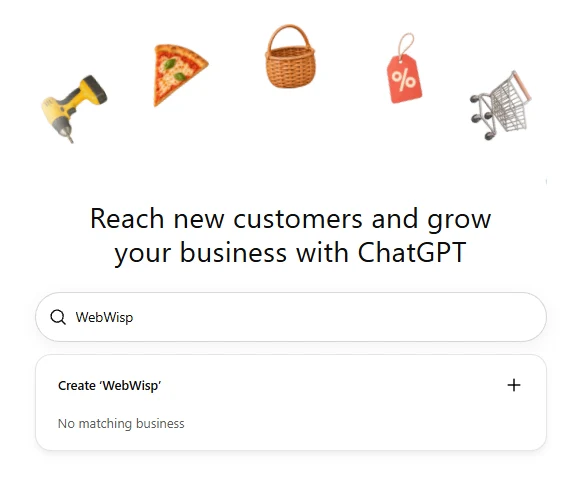
The small print under the search box says that by continuing you accept OpenAI's Businesses in ChatGPT Terms. Read the section further down this page before you go on.
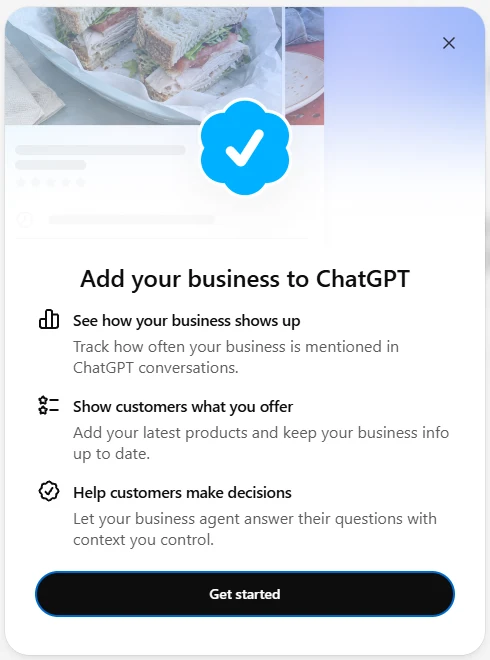
Choosing a listing, or Create, opens a short explainer of what claiming gives you: tracking how often you are mentioned, keeping your products and details up to date, and, where eligible, a business agent. Select Get started.
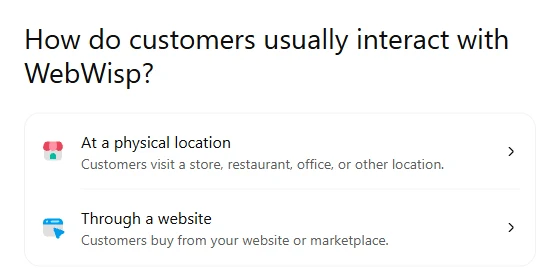
If you are creating a new profile, Business Hub asks how customers usually interact with you. On our UK account there were two choices: at a physical location, or through a website. There was no separate option for service businesses. Choose the one that honestly describes how you sell, because it decides which rules apply to you.
Business Hub then shows the verification methods available for your business. You only need one, and you will not always see all four.
| Method | What you do | Best for | Watch out for |
|---|---|---|---|
| Business phone | Choose a text or an automated call, then enter the code | Businesses whose listed number reaches a person | Phone menus and call forwarding can stop the call getting through. Testers report codes that never arrived. |
| Business email | Enter the code sent to the email address linked to the business | Businesses that read the listed inbox | The code goes to the address ChatGPT has on file, not one you choose. |
| Website domain | Add a TXT record to your domain's DNS, then select Verify domain | Anyone who can reach their DNS settings, or whose web developer can | The record expires, so add it straight away. See the next section. |
| Shopify store | Connect and log in to the store you are claiming | Shopify merchants | Connect the store that belongs to the business you are claiming. |
OpenAI reviews each claim and emails you a decision or a request for more information. You can cancel a claim while it is pending. Review times vary: some businesses report approval within hours, others are still waiting days later.
This is the step that unlocks everything else. Until Persona approves you, you cannot publish changes, connect a product feed, see insights or create an agent, and you do not get the blue check. The blue check appears after Persona approval, not when the claim is approved. The section below covers what to have ready.
Domain verification is the most reliable route for most online businesses, and it is also where people get stuck. Business Hub shows you three values: a type (TXT), a name or host, and a value starting with openai-business-claim=. You add them as a new record wherever your domain's DNS is managed. That is often Cloudflare, GoDaddy, 123-reg, IONOS or your web host, and it is not always the company you bought the domain from.
If someone else manages your website, send them the host and value as soon as you have them and keep the Business Hub screen open. Treat the value like a password while the claim is open.
Persona is the identity verification company OpenAI uses. OpenAI says you may need a government-issued ID, business registration information and proof that you are authorised to represent the business, and that the business name, address and any registration or tax number must match your official records. Before you start, have these to hand:
One UK problem has come up repeatedly. On OpenAI's own forum, a UK sole trader reported that Persona made the VAT number field mandatory even when Sole Proprietor was selected. Another UK user entered N/A, got past the form, and still failed. We have not found a confirmed fix. If you are not VAT registered and hit this, contact OpenAI Support rather than entering a number that is not yours.
Failed checks are the most common complaint from launch week. Several owners on OpenAI's forum report Persona failing with no reason given, and some say there was no way to try again. OpenAI's guidance is:
Two patterns from early reports are worth avoiding. People who claimed several businesses one after another with the same ID seem to run into trouble, and brands trading under a name that differs from the registered entity often fail. Neither is confirmed by OpenAI, but if you have several businesses, start with the one whose records are cleanest.
No, not directly. OpenAI's product page says ChatGPT keeps making independent recommendations and that claiming does not guarantee higher placement or sales. OpenAI's head of monetisation told Digiday that claiming should not affect how often a business appears, though clearer information may help ChatGPT match a business to more relevant conversations.
So claim it for accuracy and for the data, not for rankings. What earns recommendations is the same work as before: a website ChatGPT can read, pages that answer the questions your buyers ask, and other trusted sites that describe you consistently. We explain those signals in how AI engines choose who to cite.
Business Hub is closest to a mix of Google Business Profile and Google Search Console. You should keep both Google tools as they are.
| Feature | ChatGPT Business Hub | Google Business Profile | Google Search Console |
|---|---|---|---|
| Where it applies | ChatGPT answers and profiles | Google Search and Maps | Google Search |
| Edit how you appear | Yes, after OpenAI reviews each change | Yes | No |
| Verification | Phone, email, DNS or Shopify, then a Persona ID check | Postcard, phone, email or video | DNS, HTML file or tag |
| Shows the actual searches | No, only themes | Some search terms | Yes |
| Clicks to your site | Yes, 7 or 28 days | Yes | Yes, up to 16 months |
| Open to UK local businesses | Not yet | Yes | Yes |
| Cost | Free in the beta | Free | Free |
Insights shows aggregated figures for the past 7 or 28 days. Read them carefully, because the definitions are narrower than most AI visibility tools use. An OpenAI spokesperson told Digiday:
If you start using Insights, write down your first figures as a baseline. Then compare them with ChatGPT referrals in your own analytics each month.
Continuing in Business Hub accepts OpenAI's Businesses in ChatGPT Terms. They are short, but a few parts go further than a free listing usually does. This is a summary, not legal advice, so ask your solicitor if any of it matters to your business.
ChatGPT already describes businesses whether or not they have claimed a profile, using their website and other sources. If Business Hub is not open to you yet, the useful work is the same:
If you would like to know how ChatGPT and Google's AI answers describe your business today, our AI visibility audit checks it for you.
Yes. Claiming, verifying and managing a profile is free in the beta, and you do not need a paid ChatGPT plan or an Ads account. OpenAI has not ruled out charging for some features later. ChatGPT Ads are a separate paid product.
Eligible UK online businesses can. UK shops, restaurants and other local businesses customers visit cannot yet, because OpenAI currently allows local stores and restaurants to claim only existing US listings. Service-area businesses such as trades are mostly being shown a waitlist.
Phone and email codes take minutes, and a DNS record can verify within minutes once it is live. OpenAI then reviews the claim, which some businesses report taking hours and others days. The Persona ID check has its own review after that.
OpenAI does not always give a reason. The most common causes reported are a business name, address or registration number that does not match official records, and a brand name used where the legal name was needed. Use Try again if it appears, otherwise contact OpenAI Support.
OpenAI does not say a VAT number is required, but some UK sole traders report the Persona form treating it as mandatory. If you are not VAT registered, contact OpenAI Support rather than entering a number that is not yours.
No. OpenAI says claiming does not guarantee higher placement or sales, and that ChatGPT continues to make independent recommendations. It does let you correct your details and see how often you are mentioned.
Business Hub is the free area where a business claims and manages its profile in ChatGPT. ChatGPT Business is a paid subscription plan for teams using ChatGPT at work. You do not need one to use the other.
The owner, or someone authorised to represent the business, should claim it with an account the business controls. The admin can then invite colleagues or an agency to manage it, each using their own ChatGPT account. Do not forward a personal claim invitation.
Last checked on 13 November 2026. Business Hub is a beta and OpenAI's rules are changing quickly, so check OpenAI's setup guide for the latest. We will update this page as UK eligibility changes.
10 min read
What scaffolding firms should fix first: Google Business Profile, service pages, proof of competence and the basics that help AI answers describe you accurately.
Read article6 min read
The short version: SEO earns a position in a list. AEO earns a place in the answer. Here's what changes when you optimise for the second.
Read article8 min read
The answers aren't a lottery. Engines pick sources for reasons that can be understood and worked on. These are the ones that matter most.
Read articleThree working days. A short written report and a 30-minute walkthrough. No card, no commitment.